Dell SD25TB4 Pro Review: The Thunderbolt 4 Dock That Rules Them All
Who is this for?
- MacBook Pro & Windows premium laptop users
- ️ Multi-monitor workstation setups (4K/8K)
- Creators working off external SSDs
- Professionals wanting clean "one-cable" desks
Who should skip?
- Students needing portable, pocket-sized USB hubs
- Budget-conscious users with basic 1080p monitors
- Those using older laptops without USB-C/Thunderbolt
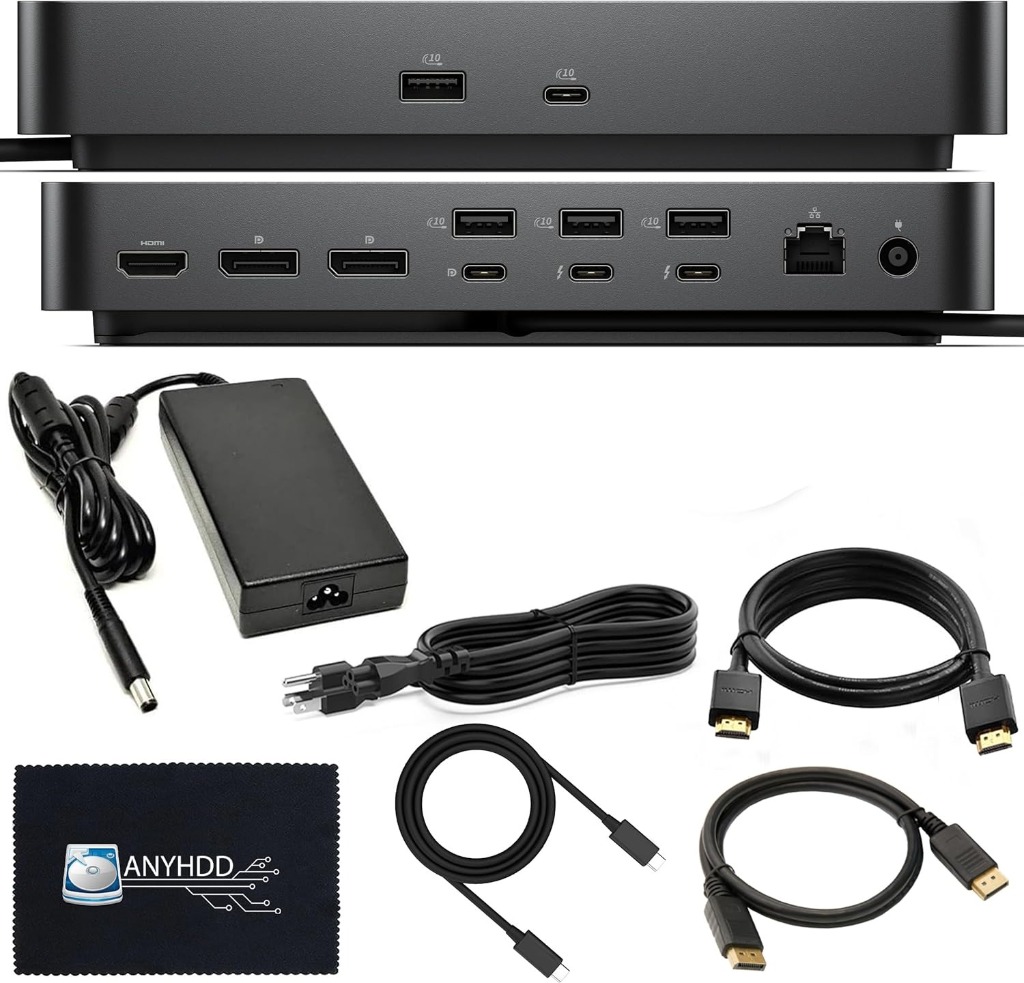
Every remote worker eventually reaches a breaking point with dongles. Connecting your laptop to power, an external monitor, an ethernet cable, and a mouse receiver every single morning is tedious. Your beautiful desk quickly turns into a tangled rat king of white and black cords.
The solution is a docking station. But in 2026, standard USB-C hubs no longer cut it for power users. We need bandwidth for 4K and 8K displays, hyper-fast external NVMe storage, and enough electrical juice to charge massive workstation laptops. That's where the Dell SD25TB4 Pro Thunderbolt 4 Smart Dock steps in.
One Cable to Rule Them All
The magic of Thunderbolt 4 lies in its insane 40Gbps bandwidth. Taking full advantage of this, the Dell SD25TB4 Pro acts as the central brain of your desk. You plug everything your DisplayPort or HDMI monitors, your gigabit ethernet cord, your mechanical keyboard, your webcam, and your studio mic directly into the back of the dock.
When you sit down to work, you take the single included Thunderbolt 4 cable and plug it into your laptop. Instantly, all your peripherals connect, your monitors wake up, and your laptop begins fast-charging. When you need to leave for a meeting or a coffee shop, you unplug one cable.
Power Delivery Explained
Never use a laptop charger again: This dock is shipped with a massive 180W power supply. This ensures the dock itself has enough power to run all of its internal controllers and connected USB devices, while still delivering up to 130W of ExpressCharge to Dell systems, and a solid 90W to Macs and other PCs . It effortlessly keeps a massive 16-inch MacBook Pro or XPS 15 fully charged under heavy load.
Pros and Cons
The Good
- Flawless Thunderbolt 4 reliability (40Gbps)
- Supports up to dual 4K monitors or a single 8K display
- Massive array of future-proof ports (HDMI, DP, USB-A, USB-C)
- Sleek, professional industrial design
The Bad
- Pricey compared to generic USB-C hubs
- The 180W power brick is physically quite large
- Requires a Thunderbolt 3 or 4 laptop for maximum performance
Stop messing with dongles.
Clean up your desk and automate your morning workflow.
Check Current Price on AmazonI/O and Port Superiority
What separates a pro dock from a budget hub is the port assortment and reliability. The SD25TB4 Pro features:
- Video: DisplayPort 1.4 and HDMI 2.1 (meaning you can hook up modern high-refresh monitors without quality loss).
- Data: Multiple USB-A 3.2 ports and downstream USB-C/Thunderbolt ports. You can daisy-chain Thunderbolt drives directly into this dock without bottlenecking your laptop.
- Network: Built-in Gigabit Ethernet for ultra-stable ZOOM calls and large file transfers, completely bypassing sluggish Wi-Fi.

Cross-Platform Compatibility
While branded as a Dell product, the Thunderbolt 4 protocol is an industry standard natively supported by Intel and Apple. If you own an M1, M2, M3, or M4 MacBook Pro, this dock works beautifully with macOS out of the box, requiring zero driver hunting. It bridges the gap seamlessly for households that use both Windows PCs for gaming and MacBooks for work.
The Final Verdict
High-end docking stations are one of the unsung heroes of a productive workspace. The Dell SD25TB4 Pro represents the pinnacle of Thunderbolt 4 connectivity. By outsourcing the heat, power management, and port stress away from your laptop's chassis and into this dedicated aluminum brick, you protect your laptop's lifespan while enjoying a pristine, multi-monitor workstation experience.